DIWALI26-6LTN for 5% OFF on a paid plan — Ends 16 Nov 2026!🎉 Launch offer: use DIWALI26-6LTN for 5% OFF on a paid plan — Ends 16 Nov 2026!QR Code Menu for Your Restaurant
Let your customers scan, see your menu, place orders and leave Google reviews — all from their mobile.
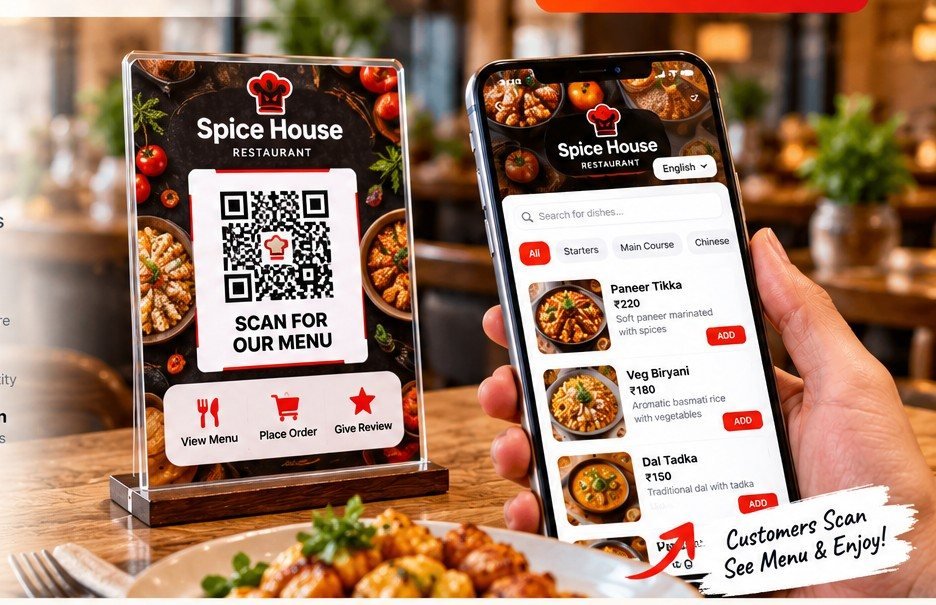 📱 Scan the QR👀 See the menu
Choose the right plan for your restaurant
Start free with all features for 30 days. No payment required for the free trial.
Lock in your launch price before this offer expires.
30-Day Free Trial
Try every feature included in Sell Through My Menu (₹999/month) for 30 days.
- Multiple menu images and language support
- Unlimited QR code generation
- Restaurant name, logo branding and Google Review link
- Add, edit, delete and deactivate dishes
- Real-time dish price and availability updates
- Create and manage combos and Today’s Special
- Dedicated restaurant dashboard
- Table-wise QR codes (up to 20 tables)
- Hotel Room No. wise Menu QR (1 demo room included)
- Customer ordering with dish quantities
- Orders appear directly in the kitchen
- Place additional orders from the same table
- Order management and order history
- POS/manual billing
- Razorpay online payment integration
Show My Menu
Display your restaurant menu online using QR codes.
- Upload multiple menu images
- Unlimited QR code generation
- Mobile-friendly menu display
- Multiple language support
- Restaurant name and logo branding
- Google Review link
- Update or replace menu images anytime
- Table No. wise QR code
- Live dish and price management
- Customer ordering and online payments
- POS billing
Manage My Menu
Manage dishes, prices, combos and daily specials yourself.
- Everything in Show My Menu
- Add, edit, delete and deactivate dishes
- Update dish prices in real time
- Manage dish availability
- Create and manage dish combos
- Display Today’s Special
- Dedicated restaurant dashboard
- Generate POS bills
- Table No. wise QR code
- Customer ordering from tables
- Online customer payment integration
Sell Through My Menu
Let customers order from their tables using QR codes.
- Everything in Manage My Menu
- Table-wise QR codes
- Hotel Room No. wise Menu QR (1 demo room included)
- Customer ordering from mobile phones
- Orders appear directly in the kitchen
- Select dishes and quantities before ordering
- Place additional orders from the same table
- Order management and order history
- Online payments through Razorpay integration
- POS billing
- 20 tables included · extra tables ₹99/table/year or ₹10/table/month + GST
How it works
Set up your digital menu with a few simple steps.
Choose a plan
Try every feature of the ₹999/month plan free for 30 days, or choose a paid plan.
Create your account
Enter your restaurant name and mobile number. Your restaurant dashboard is created automatically.
Launch your QR menu
Upload menu images, create QR codes and share them with customers. Paid plans continue through secure checkout.
Frequently asked questions
Is the free trial really free?
Yes. It provides all features for 30 days and does not require a payment. A restaurant name and mobile number can only claim the free trial once.
Do I need an email address?
Email is optional. A valid 10-digit mobile number and a password are required to create your account.
When does a paid plan become active?
You fill in your details, then pay on a secure payment screen. Your account and restaurant are created only after Razorpay confirms the payment.
Is there a minimum period for monthly plans?
Yes. Monthly plans are billed for a minimum of 3 months at signup (for example 3 × ₹99 = ₹297). Yearly plans give you 5% off.
Can I log in if I already have an account?
Yes. Use the Login link in the header to access your existing account.